
| Setting Up Your SAS Session |
| Setting System
Options |
| How the YEARCUTOFF= Option Works
When a two-digit year value is read, SAS software defaults to a year in the twentieth century. The default value of YEARCUTOFF= is 1920. |
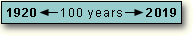
| Date Expression | Interpreted As |
|---|---|
| 12/07/41 | 12/07/1941 |
| 18Dec15 | 18Dec2015 |
| 04/15/30 | 04/15/1930 |
| 15Apr95 | 15Apr1995 |
However, you can override the default and change the value
of YEARCUTOFF= to the first year of another 100-year span. For example,
if you specify YEARCUTOFF=1950, then the 100-year span will be from 1950
to 2049.
options yearcutoff=1950; Using YEARCUTOFF=1950, dates are interpreted as shown below: |
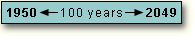
| Date Expression | Interpreted As |
|---|---|
| 12/07/41 | 12/07/2041 |
| 18Dec15 | 18Dec2015 |
| 04/15/30 | 04/15/2030 |
| 15Apr95 | 15Apr1995 |
|
|
Copyright © 2002 SAS Institute Inc.,
Cary, NC, USA. All rights reserved.