
| Creating Bar and Pie Charts |
| Specifying
Statistics |
| To specify a statistic other than the default statistic FREQ, you use the TYPE= option in the statement that specifies the chart. Let's look at the general form of the GCHART procedure again, this time focusing on the options. The TYPE= option is just one of the possible options. Notice that a slash precedes options. |
General form, PROC GCHART step with TYPE=
option:
PROC GCHART <DATA=SAS-data-set>; where statistic indicates the statistic of the chart variable to be displayed. Statistics include CFREQ (cumulative frequency), PERCENT (percent), and CPERCENT (cumulative percent).
|
| Example
The program below creates a vertical bar chart of the
variable proc gchart data=clinic.insure;
vbar company;
run;
|
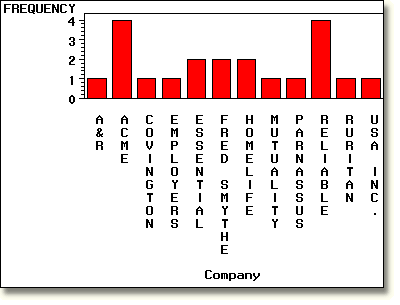
If you use the TYPE= option to specify the statistic
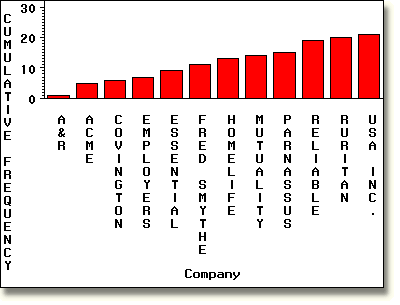
CFREQ, the bars now display the cumulative
frequency of Company, as shown below. Notice that the
label on the vertical axis has changed from FREQUENCY to CUMULATIVE
FREQUENCY.
     proc gchart data=clinic.insure;
        vbar company / type=cfreq;
     run;
|
     |
|
|
|
Copyright © 2002 SAS Institute Inc.,
Cary, NC, USA. All rights reserved.
